


About the Passage HackTheBox machine
Operating system: Linux | Difficulty: Medium | Status: Retired
Passage is a retired Medium-rated Linux machine themed around a CuteNews-powered site. The initial foothold exploits an authenticated arbitrary file-upload vulnerability in CuteNews 2.1.2 (found via searchsploit) to achieve remote code execution, followed by password-hash cracking and SSH credential reuse to move laterally, and finally a USBCreator D-Bus abuse for root. It is a superb exercise in CMS exploitation and offline hash cracking.
Greetings from Macksofy Technologies. Below is the detailed walkthrough of the Passage machine which got retired from HackTheBox
The IP of this box is 10.10.10.206
Port Scan
Running NMAP full port scan on it , we get
We got only
2 Open Ports that too for SSH and Web
Moving towards the Web Part
Web
Checking the IP in the browser, we get a RSS Feed page
Scrolling down further in the page, we see that it is powered by CuteNews
Clicking on the RSS button on the above which we saw before , it redirects us to rss.php on the CuteNews web directory
If we look clearly, we can see the CuteNews version ,i.e, 2.1.2 and now moving onto searching for potential exploit through searchsploitNow we try to just access the CuteNews directory, it leads us to the login page
We have an Authenticated Arbitrary File Upload vulnerability on this version, since we dont have any credentials so we will register a new user and then login
As soon as we register, it redirects us to the dashboard with our newly created user
Clicking on the Personal Options, it redirects us to the user settings page and from there we can upload our avatar
We will use a small php web shell to upload in the avatar section
Now we intercept the upload functionality into burp and modify the settings and add the GIF code and change the MIME type to JPEG so that we can bypass the restriction
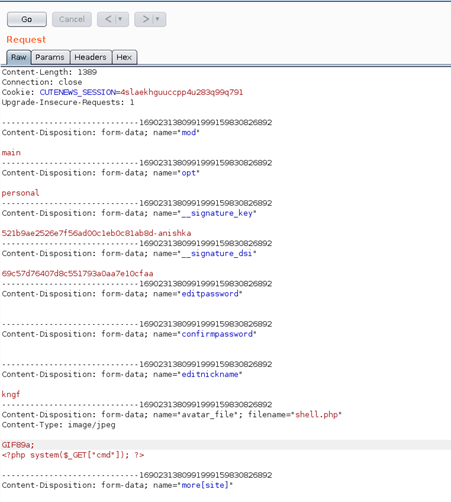
After sending the request, we can see that our file got uploaded successfully
We can right click and view the image to see the location of the shell
Now we can confirm that we have code execution successfully
Getting reverse shell and checking out netcat listener
We have shell as www-data and now move onto user privilege escalation
Checking into the /CuteNews/cdata/users in the webroot directory, we have a file named lines which has many base64 encoded strings
One of the base64 encoded strings had serialized objects which contained password for user paul which was SHA-256 hashed
We cracked
the password online and then switched to user paul
We have our user flag here and then move to privilege escalation to root
Privilege Escalation
Checking the SSH directory of the current user, we see that it has public and private keys which can be used for the other user nadav on the box
So we directly SSH to the other user and get in
Checking the current id of the user , we see that the current user is in the sudoer’s group but we cant use sudo here as it will require password which we dont know in this case
When running linpeas script, we see that the server has USBCreator installed which has a vulnerability where we can use take advantage of the sudo which wont require password , to know more about the vulnerability check the references section in the end of this writeup
To get root shell, we will first upload our SSH to the box and then move further to exploit the vulnerability
The below commands is what stated in the explanation of the writeup, here we upload the ssh key to the root’s ssh folder
We connect to root user through ssh with our keys and get in successfully
References
USBCreator D-Bus Privilege Escalation in Ubuntu Desktop
unit42.paloaltonetworks.com
Tags: ctf, hackthebox, htb, linux, medium
Skills you practise on Passage
- Fingerprinting a CMS and matching it to a public exploit with searchsploit
- Exploiting an authenticated file-upload vulnerability for RCE
- Cracking captured password hashes offline
- Lateral movement through reused SSH keys and credentials
- Privilege escalation by abusing a privileged D-Bus service
How Passage maps to your OSCP / PEN-200 preparation
The enumerate → gain a foothold through a web or service vulnerability → escalate to root workflow on Passage mirrors the exact methodology assessed in the OSCP exam. If you want to build this skill set under expert mentorship with an exam-focused lab environment, explore Macksofy’s OSCP (PEN-200) training and certification programme.
More HackTheBox writeups from Macksofy
- HackTheBox Academy (Easy Linux)
- HackTheBox Luanne (Easy NetBSD)
- HackTheBox Time (Medium Linux)
- HackTheBox Laboratory (Easy Linux)
- HackTheBox Feline (Hard Linux)
Browse every walkthrough in our HackTheBox writeups collection, or go deeper with our penetration testing articles.

Macksofy Expert Trainers
Macksofy Expert Trainers is the collective byline for certified cybersecurity instructors at Macksofy Trainings. Our trainers hold OSCP, OSWE, OSEP, CEH, CPENT, SOC-200, CompTIA, and other industry certifications, and bring combined hands-on experience in commercial penetration testing, red team operations, SOC analysis, threat hunting, and DFIR engagements across Indian BFSI, government, and enterprise clients. Articles under this byline are collaborative pieces written, reviewed, and fact-checked by multiple Macksofy trainers to ensure technical accuracy and exam-relevance.
Active practitioner certifications across the trainer cohort: OSCP, OSWE, OSEP, OSED, OSCC, CEH v13 AI, CHFI, CTIA, CPENT, ECIH, CCISO, SOC-200 (OSDA), CompTIA Security+ / Network+ / CySA+ / Linux+. Commercial engagement experience covers penetration testing, red team operations, SOC analysis, threat hunting, and DFIR for Indian BFSI, fintech, government, and MSSP clients.